

February 15, 2025
Secure Your WordPress Site by Changing the Default Login URL with WPS Hide Login Plugin

By default, WordPress login pages are accessed via wp-login.php, which makes it an easy target for brute-force attacks. Unfortunately, WordPress does not provide built-in settings to change this default login URL. This creates a potential security vulnerability by leaving the login endpoint predictable and exposed.
Introducing WPS Hide Login Plugin
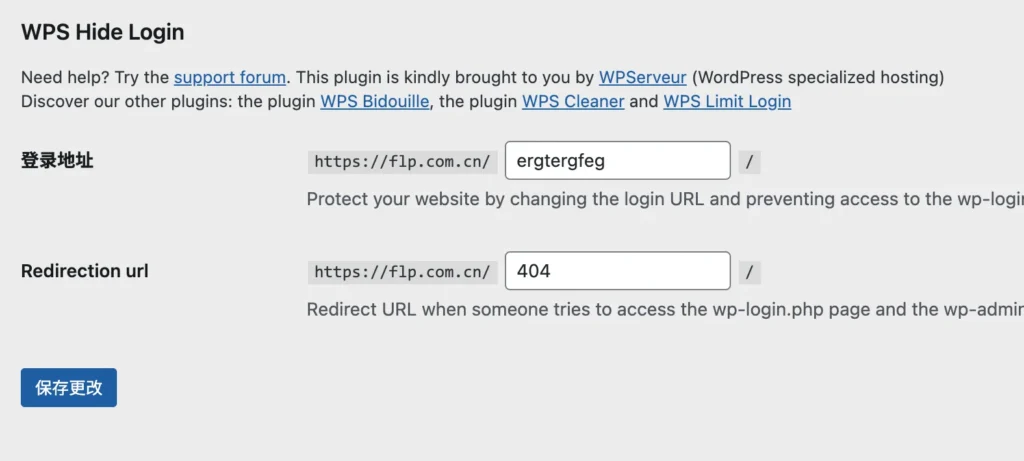
The WPS Hide Login plugin solves this problem by allowing you to easily customize the login URL of your WordPress site. Once installed, it adds two new fields to the Settings → General page in the WordPress dashboard:
- Login URL: You can set this to a custom string that’s easy for you to remember—or completely random for better security. Visiting this new URL will bring up the familiar WordPress login screen.
- Redirect URL (when wp-login.php is accessed): This determines what happens when someone tries to access the default
wp-login.phppage. Setting this to a404page is recommended, so anyone trying to brute-force their way in using the default login URL will encounter a dead end.
Key Advantages
- Enhanced Security: Hiding the default login page adds an effective layer of protection against brute-force attacks.
- No Core File Modifications: WPS Hide Login doesn’t alter any core WordPress files.
- No URL Rewrite Rules: It doesn’t rely on .htaccess modifications or redirections.
- Reversible: Simply deactivate the plugin to restore the default
wp-login.phplogin page instantly.
How It Works
WPS Hide Login works by intercepting login requests and routing them through your chosen custom URL. This lightweight approach keeps your site stable and avoids conflicts with other plugins or server configurations.
